




LIFX Outdoor SuperColor Neon Flex 16ft - 2150 Lumens

Not just another light—a LIFX SuperColor Neon Light. Unlike anything you’ve seen outdoors, Neon Flex packs premium RGBW LEDs into a wet-location-rated 16ft strip. Like classic neon brought into the smart era, it glows with vibrant colors and brilliant whites inside a flexible matte silicone sleeve you can bend and shape to suit your space.
Plan a full outdoor setup Size up your power needs

$169.00
1
  • No hub required
  • 16M colors + whites
  • Matter certified
  • Ready in 90 seconds
  • Free shipping
  • 2-year warranty
Also at:

Why you'll love it

Everything you need to know

Bring the Color Outdoor

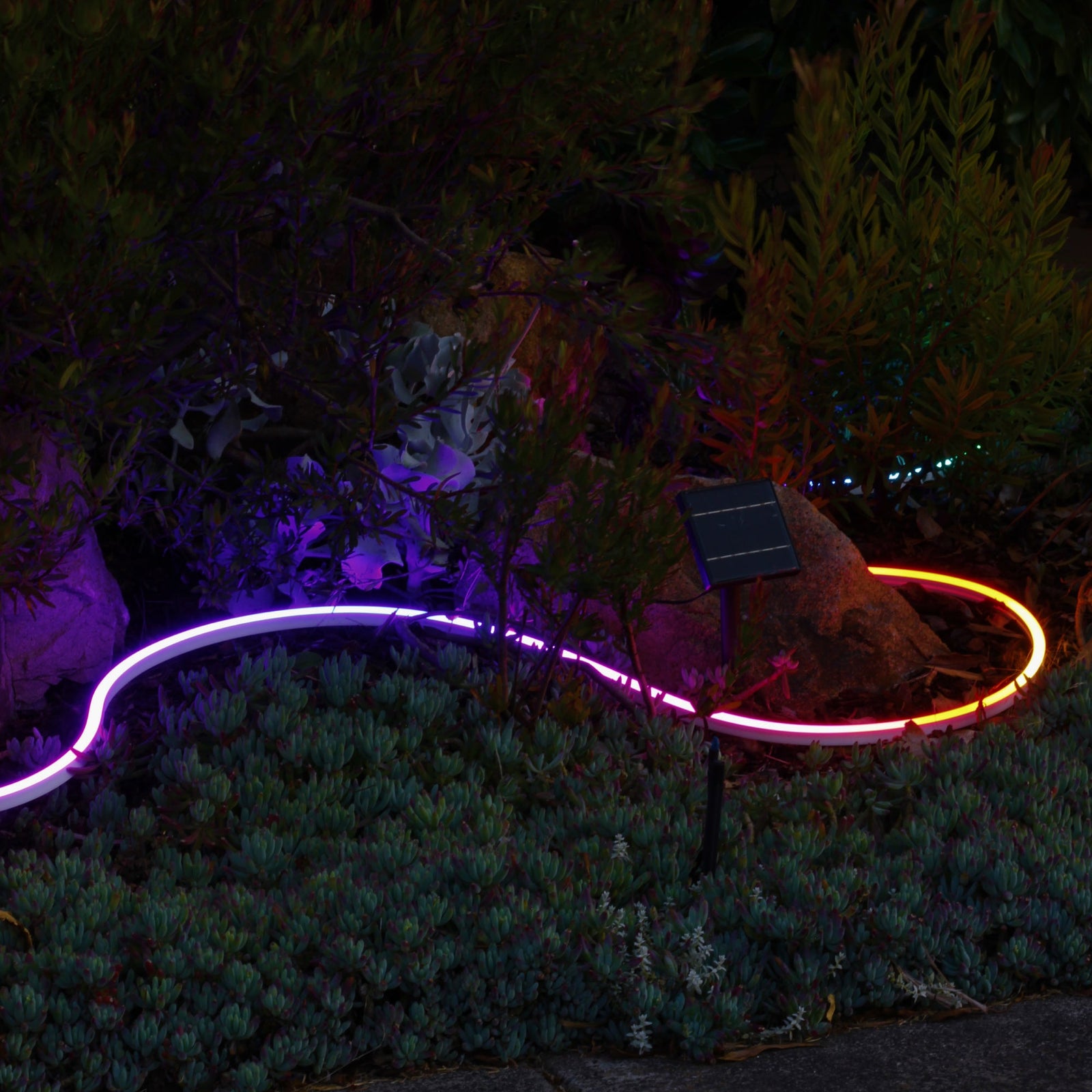
  • Ten years of SuperColor indoors, now outdoors. The LIFX Outdoor Neon Flex is a water-resistant wonder light that turns your garden into a Polychrome wonderland.
  • Designed for installation flexibility. Plug it into a standard mains outlet or use the included clamps to connect to low-voltage wiring. Outline pathways, landscaping, and architectural features, or shape your own design.
  • Polychrome in the garden. With 60 addressable color zones, you get textured light made of many tones from one strip. More zones mean more color mixing and reflections that feel like magic.
  • Set the mood for any moment. Use the LIFX app and 2.4GHz Wi-Fi to shift from classic warm ambience to vibrant color and dynamic motion, whether it’s a romantic dinner or a backyard party.
  • Smarter with Matter. Matter is built into the brains of this LIFX, so it talks seamlessly with other smart devices and platforms. Prefer hands-free? Ask Hey Google, Alexa, Siri, or SmartThings to set the scene or schedule the perfect vibe.

Get the most from your lights with the LIFX app, built to unlock the full power of every LED. Choose solid colors with precision using a 360° color wheel and fine-tune saturation and brightness from 1% to 100% for perfect balance.

Want more depth? Try Color Blends and Gradients to paint your lights with multi-tone hues that shift seamlessly, creating the perfect atmosphere for any mood or moment.

Create Scenes that are uniquely yours. Save your favorite lighting combinations with the perfect mix of color, brightness, and effects, then bring them back anytime with a single tap.

Scenes can be scheduled to match your routine or added to the LIFX Widget for quick access from your phone or smartwatch. Whether it’s a calm morning glow or a burst of party color, your perfect lighting is always within reach.

Discover Themes, beautifully curated lighting moods crafted by LIFX designers to transform your space with a tap. Choose from hand-picked looks like Golden Hour, Movie Night, or Holiday Glow to instantly match the moment, from calm evenings to celebrations or game-day energy.

Every Theme can include subtle animation, bringing movement, warmth, and atmosphere that feels alive. Each is designed for effortless ambiance and personality that suits any occasion.

From gentle Sunrises and drifting Clouds to playful Christmas, Halloween, or Meteor effects, your space becomes a canvas for creativity and mood. Explore immersive, animated lighting that moves, shifts, and responds—more than illumination, it’s art in motion.

Some effects are available only on select LIFX products with advanced zoning and FX support, so the more capable your light, the deeper the magic. With LIFX, your lighting isn’t just functional—it’s expressive, alive, and uniquely yours.

Let your lights run the show with simple, intelligent routines — on at sunset, off at bedtime, or tuned to match your day. Explore app Presets like Circadian Rhythm for natural light that follows your body clock, or Evening Relaxation to unwind in soft, soothing tones. Lighting that feels effortless — and perfectly in sync with you.

Neon Flex Setup

04 steps

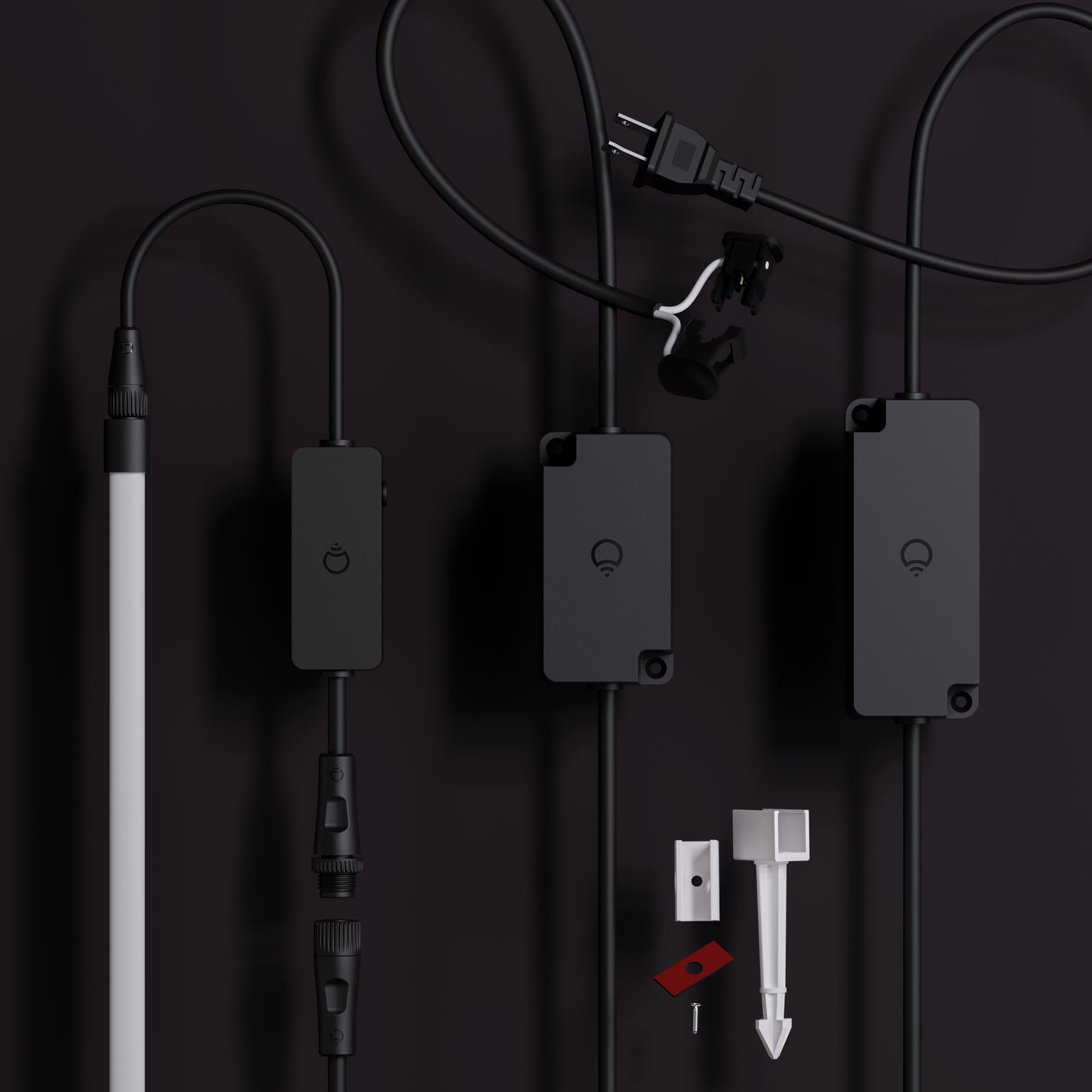
Everything you need to install and onboard your Neon Flex is included in the box. Pair with your existing low voltage system or use the main power supply provided.

In the box:

  • 16ft LED rope light
  • LIFX Wi-Fi smart controller
  • Low voltage clamp connector
  • Alternative mains power supply
  • 10 x ground spikes
  • 10 x screw mounts
  • 10 x adhesive mounts

You’ll Need:

  • A smartphone (iOS 18.0+ or Android 8.1+)
  • The LIFX app (download from App Store or Google Play
  • A 2.4 GHz Wi-Fi network (Most smart devices require 2.4 GHz. If your router combines 2.4 GHz and 5 GHz, that’s usually fine.)
  • Your Wi-Fi password

Important Notes:

  • Keep your phone near the light during setup.
  • Make sure Bluetooth is enabled.
  • Ensure your phone is connected to the same Wi-Fi network you want the light to use.

Installation type (choose one)

  • Low voltage — connects to an existing 12V outdoor lighting transformer. Best if you already have a low voltage garden lighting system installed.
  • Mains powered — plugs into a standard outdoor outlet. Best for new installs with no existing transformer.

If using low voltage

  • Check your transformer has sufficient wattage available — you need at least 85W allowance remaining after wiring calculations
  • Your system must be 12V
  • Clamp the provided cable to your low voltage system wire, the same way you'd connect any other garden lighting accessory

If using mains powered

  • Use a GFCI-protected outdoor outlet
  • Do not use an extension cord unless the plug can be fully and firmly inserted — do not alter or replace the plug

Mounting method (choose one)

  • Ground stake — for garden beds and soft soil
  • Surface mount — for wood, masonry, pavers, or other solid surfaces using channels fixed with screws or double-sided adhesive

Ground stake steps

  1. Lay the Neon Flex out and bend it into your desired shape before fixing anything down.
  2. Press the ground stake firmly into the soil until fully seated. If the ground is hard, wet or loosen the soil first — a rubber mallet can help.
  3. Press the Neon Flex into the channel along its full length until it seats securely.

Surface mount steps

  1. Lay the Neon Flex out and plan your shape before attaching anything.
  2. Position the channels in the desired shape. For screws: attach through the holes provided. For adhesive: peel the backing and press firmly onto a clean, dry surface.
  3. Press the Neon Flex into the channel clips along its full length until fully seated.

Connecting to power (all mounting types)

  1. Ensure the product is disconnected from power before assembling or positioning.
  2. Connect the cable to the Neon Flex wire — align the two connector sides, then screw the cap over the join tightly to ensure a waterproof seal.
  3. Cap any unused connector ports — never leave a port uncapped outdoors.
  4. For low voltage: clamp the other end of the cable to your system wire at the transformer run, as you would any other garden lighting accessory. For mains: plug into an appropriate outdoor outlet.

Detection sweep & pairing

  1. Power on. If the flex was connected before you powered the controller, it will automatically run a detection sweep along the full length.
  2. If you connected the flex after powering the controller, press the button on the controller for 2–3 seconds. A light will run the full length of the Neon Flex as it detects it.
  3. Download the LIFX app (iOS 14+, Android 8+) and sign in. Tap + in the bottom right to add your light — connect to your 2.4 GHz Wi-Fi network when prompted.
  4. To use Matter, scan the code on the back of the manual from within your smart home platform. A Matter-enabled hub (Google, Apple, or similar) is required for home & away automations.

Tips

  • Do not bury wire more than 6" underground.
  • Ensure all connectors are tightly secured to prevent water entry — do not submerge the product.
  • Do not secure wiring with staples, nails, or sharp hooks — do not damage the wire insulation.
  • Keep the flex away from heat sources including heaters, fireplaces, and candles.
  • Only connect to official LIFX Outdoor compatible products and accessories.
  • To factory reset, hold the button on the controller for 5–7 seconds. This returns the device to original factory settings. Note: this is different from the detection sweep (2–3 seconds).
  • LIFX connects to 2.4 GHz Wi-Fi only. If you have both bands, check your phone's Wi-Fi details to confirm which you're connected to before pairing.

Select your device below to get step-by-step setup instructions tailored to your phone. We recommend using the Matter QR code method for the quickest and most reliable connection — you'll find the QR code in your product manual, or printed on the back of your device.

Choose your OS

Neon Flex 16ft Outdoor

  • Brightness2150 lumens
  • Color range16M colors
  • White range1500K–9000K
  • CRI82
  • FittingWall Plug (Type A)
  • Zones60
  • Dims192 in × 0.5 in × 0.83 in
  • Warranty2 years
Download manual Download spec sheet
ModelLFXNEON16/WPBarcode9347403004954
Customer Reviews

Real homes. Real lights.

No RISK

Buy it. Try it. Decide later.

  • 30 nights to decideNot right? Send it back for a refund. $14.99 return shipping fee applies.
  • 2-year warrantyHardware coverage, end to end. We ship a replacement first.
  • Free Shipping ** All orders over $79 ship free 
Can I cut the Outdoor Neon Flex to length?

Yes — the Neon Flex can be cut to length at the marked points spaced every 19-20 inches, but once cut, that section can't be reconnected or extended further, and cutting will void the warranty, so this should only be done at your own risk. If you'd rather not cut it, you can extend length instead using additional Neon Flex sets, letting you build custom shapes and longer runs without touching a blade. In total, the 16ft set can be extended to roughly 32ft.

Is it actually safe to install outside?

Yes. Outdoor Neon Flex carries an IP67 rating, meaning it's fully protected against dust and can handle submersion in water, so rain, sprinklers, and general weather exposure aren't a concern. It's built to stay outside year-round.

How do I install it? Do I need an electrician?

No electrician required. You get two install options: plug it straight into a standard mains outlet for simple setups, or use the included low-voltage wiring and clamps if you're running it along garden beds, fence lines, or longer outdoor stretches. Ground stakes let you press it directly into soil, or you can mount it to surfaces with screws or adhesive.

Does it need a hub or bridge to connect?

No. Outdoor Neon Flex connects directly to your 2.4GHz Wi-Fi and controls entirely through the LIFX app, plus voice assistants like Alexa, Google Home, and Apple Home. No extra hardware, no separate hub sitting on a shelf somewhere.

What can it actually do with 60 zones?

With 60 individually addressable zones packed into the 16ft run, you get real gradient effects, not just one flat color end to end. Think flowing sunsets, chasing rainbow effects, or color transitions that move along the strip. At 2150 lumens and a 1500K–9000K white range, it also handles straight warm-to-cool white lighting if you want something more subtue for everyday use.

Can I connect multiple Outdoor Neon Flex units together?

Yes. You can extend a single run up to roughly 32ft by connecting units together, which is enough for most patios, rooflines, or garden borders. If you need it longer, running a second independently controlled section from the app is the better option rather than trying to stretch one continuous run too far.

Featured in the publications you already trust
WIREDThe VergeWirecutterEngadgetFast CompanyThe New York TimesGizmodo
Stay in the loop

New products, launches and the occasional good deal. Unsubscribe any time.